

Five years ago I was editing videos in YukkuriMovieMaker4 (YMM4), and the preview froze every time playback reached a video item. I wrote about it in an article on playing video items smoothly in YMM4 (in Japanese). My conclusion back then was: “Editing with the original variable-frame-rate (VFR) recording is smoother, but I worry about audio drift.”
So what about now? I retested it on the latest YMM4. The short answer: I could not reproduce the old problem. Changing the video format or the drive (HDD or SSD) made no difference, and when I edited VFR footage as it was, the exported video had no frame offset that would cause audio drift. My guess is that YMM4 improved over its many updates.
This article reflects the situation as of November 2026. The old article used YMM4 v3.9.9.173 β73 and assumed exporting through AviUtl.
[ Reference ] Test environment
| Item | Details |
|---|---|
| YMM4 | v4.57.0.1 |
| OS | Windows 11 |
| CPU / GPU / RAM | Core i5-14600KF / GeForce RTX 5070 / 64 GB |
| Project | 1920×1080, 60 fps, about 66 seconds. A let’s-play layout: a gameplay recording (Crimson Desert, a scene with a lot of motion) as a video item in the background, with Yukkuri Reimu and Marisa character art and dialogue on top |
| Where the footage was stored | An NVMe SSD and a SATA HDD |
My PC is much faster than the one I had back then. These are results on a fairly fast current PC, and I could not test a slower one. To make up for that, I deliberately created heavy conditions to find where the preview starts to struggle.
- What I found on the latest YMM4
- The problem in 2021, and what I concluded then
- How I measured
- Does the preview change with the video format or the drive?
- Does editing VFR footage as it is cause audio drift?
- Where does the preview start to struggle?
- Is there a setting that makes the preview lighter? (preview quality and resolution)
- If the preview is still heavy or freezes
- 2021 versus now
- Summary
What I found on the latest YMM4
- The loading pause or freeze each time playback reached a video item did not happen
- The smoothness of the preview did not change with the video format (H.264, H.265, AV1; constant or variable frame rate) or with the drive (SSD or HDD)
- Editing and exporting VFR footage as it was produced no offset in the picture, not even one frame (checked on a video of about 66 seconds). In what I tested, converting to a constant frame rate was not needed
- The preview became heavy when I played twelve 4K videos, or about thirty Full HD videos, at the same time. The GPU’s video decoding had hit its limit
- YMM4 has no setting that lowers the preview resolution or quality to make it lighter. Changing Hardware decoding process made no difference on this PC
The problem in 2021, and what I concluded then
The trouble was a loading-like pause every time the playhead touched a video item. I had to wait at every cut, and a straight playthrough froze at each video item. This is a recording from that time.
Here is what I tried then, and what happened.
| What I tried | Result in 2021 |
|---|---|
| Moving the video files from an HDD to an SSD | No change (the preview in AviUtl did get smoother) |
| Editing with the original variable-frame-rate (VFR) recording instead of a copy converted to a constant frame rate (CFR) | Smoother. I adopted this as the fix |
| Audio drift when editing VFR footage as it was | I was worried, but saw no noticeable drift |
Back then YMM4 could not export a video by itself, so I passed the project to AviUtl. The old article also covers the settings for that (L-SMASH Works and so on), but the current YMM4 exports on its own, so they are no longer needed. I cover the export settings in YMM4 Export Settings: Why the File Is Huge and Which Bitrate to Use.
How I measured
I could not find a dropped-frame or frame-rate display in YMM4, so I turned the behavior into numbers this way:
- Playback progress: play for 20 seconds from frame 0 and see how many frames the playback position advanced. 1,200 frames means real time
- Picture stalls: capture the preview area about 60 times a second and measure how long the picture stayed unchanged. I counted anything over 0.09 seconds as a stall
- Seek delay: the time from jumping to a distant frame until the preview picture changed
- Loading: the time from launching YMM4 until the project was open (I restarted YMM4 for each condition)
All of these are numbers for comparing one condition with another. I could not confirm how many frames per second the preview actually shows (with this method, every condition gave about 31 to 33 picture changes per second). Hitches shorter than 0.09 seconds are also not captured.
Does the preview change with the video format or the drive?
I put a 67-second video of the same scene in the background in several formats, and measured playback and seeking.
| Footage | Loading | Seek delay | Progress in 20 s of playback | Stalls over 0.3 s |
|---|---|---|---|---|
| H.264, 1080p, 60 fps constant, about 12 Mbps | 5–6.5 s | 0.04–0.13 s | 0.99× real time | None |
| H.265, 1080p, 60 fps constant, about 12 Mbps | 4.8 s | 0.04–0.09 s | 0.99× | None |
| AV1, 2560×1440, slightly variable (as recorded) | 5.2 s | 0.04–0.08 s | 0.99× | None |
| A 10-minute file of the same recording, used from the 5-minute mark | 4.9–5.2 s | 0.04–0.09 s | 0.99× | None |
| H.264, 1080p, about 70 Mbps | 9.4 s | 0.04–0.25 s | 0.98× | None |
- In every format, playback advanced at almost real time and never froze at the video item
- In every condition there is a pause of about 0.3 seconds at the moment playback starts. It was the same with the character art and dialogue removed, leaving only the video item
- Only the high-bitrate 70 Mbps video was a little slower to load and in some seeks
- Splitting the video item into ten pieces produced no measurable stall at the boundaries. The official FAQ page on stutter at the split point of a video (in Japanese) says the video is reloaded at a split point, and that this affects only the preview, not the exported video
HDD versus SSD
In 2021 I suspected the slow HDD, moved the files to an SSD, and saw no change. This time I again put the same footage on a SATA HDD and compared. Windows keeps a file it has read once in memory, which makes later reads faster, so to get first-read numbers I prepared three copies of the footage and used each one once.
| Drive | Seek delay | Pause at the start of playback | Progress in 20 s of playback | Stalls over 0.3 s |
|---|---|---|---|---|
| NVMe SSD | 0.04–0.13 s | About 0.3 s | 0.99× | None |
| HDD (first read) | 0.06–0.12 s | About 0.3 s | 0.99× | None |
| HDD (second read onward) | 0.04–0.10 s | About 0.3 s | 0.99× | None |
I saw no difference between the HDD and the SSD (the table is for the H.264 1080p footage; the 10-minute file and the ten-piece split gave the same result). “Moving to an SSD does not help” is still true. Where the video is stored does not seem to be what makes the preview heavy.
Does editing VFR footage as it is cause audio drift?
Recordings of a game or a phone screen often have a frame rate that is not constant: a variable frame rate (VFR). Editing software can let the picture and sound of VFR footage slowly drift apart, so the standard advice was to convert to a constant frame rate (CFR) before editing. I used to convert with ffmpeg or HandBrake too.
To see whether the current YMM4 still needs this, I exported these three with the same settings:
- A constant-frame-rate video (60 fps)
- A deliberately extreme VFR video (made from the video above by dropping frames so that it alternates between 60 fps and 15 fps every two seconds; the audio is untouched)
- The original recording (AV1, slightly variable)
I compared the picture of each exported video with the picture of the source at the correct time, every 10 seconds, and measured the offset in frames.
| Footage | Exported video | Picture offset (0–66 s) |
|---|---|---|
| Constant frame rate | 60 fps constant, 3,987 frames | 0 frames |
| Extreme variable frame rate | 60 fps constant, 3,987 frames | 0 frames |
| As recorded (slightly variable) | 60 fps constant, 3,987 frames | 0 frames |
- In all three, the picture was not off by a single frame from start to finish. The exported audio also showed no offset between the constant and variable versions
- In the preview too, the playback position advanced in real time with the VFR footage (the 15 fps stretches look choppier because the footage has fewer frames there)
- The exported video was 60 fps constant frame rate for every source
What I checked was a video of about 66 seconds. I did not test recordings longer than an hour, or footage from the phone recording app I used back then. Still, the offset was 0 even with the extreme VFR video, so it seems safe to say that the current YMM4 picks frames by their timestamps. In what I tested, converting to a constant frame rate before editing was not needed.
By the way, Treat all videos as 60fps (CFR) (すべての動画を60fps(CFR)としてあつかう) under External Linkage (外部連携) in Settings is an option for Exo output to AviUtl. It does not matter if you export from YMM4 alone (I left it off).
Where does the preview start to struggle?
In normal use the preview never got heavy on this PC, so I shrank video items, lined them up, and increased the number playing at once to find the limit. “GPU decode” is the usage shown as “Video Decode” for the GPU in Task Manager.
| Videos playing at once | Seek delay (max) | GPU decode | Preview |
|---|---|---|---|
| Full HD (12 Mbps) × 1 | 0.1 s | 3% | Smooth |
| Full HD × 4 | 0.2 s | 11% | Smooth |
| Full HD × 8 | 0.5 s | 22% | Smooth |
| Full HD × 16 | 0.8 s | 40% | Smooth. The pause at the start of playback grows to 0.6 s |
| Full HD × 28 | 1.0 s | 64% | Mostly smooth. Short stalls begin to appear |
| Full HD × 32 | 1.4 s | — | The playback position advances, but the picture stays frozen |
| 4K (45 Mbps) × 1 | 0.4 s | 11% | Smooth |
| 4K × 4 | 0.7 s | 41% | Smooth |
| 4K × 8 | 1.5 s | 74% | Smooth |
| 4K × 12 | 2.2 s | 94–96% | The picture freezes for 1 to 5 seconds, again and again |
| 4K × 16 | 3.2 s | — | The picture stays frozen |
- The preview got heavy when the GPU’s video decoding approached its limit (over 90%). The way the picture “freezes for a few seconds, again and again” with twelve 4K videos looks a lot like the 2021 problem
- Even when it is heavy, the playback position advances in real time. Only the picture update lags or stops
- The more videos, the longer the seek delay and the pause at the start of playback
- With the same twelve 4K videos, lowering the bitrate of the footage from 45 Mbps to 10 Mbps cut the stalls from 1–5 seconds to 0.1–0.7 seconds. Lighter footage helps
- Video effects: applying Blur or Color Correction to one video did not change the smoothness. Lens blur raised GPU usage from 4% to 28%, but playback stayed smooth
On this PC, a let’s-play video with one or two background videos is far below the limit. Put the other way, a slower PC or an integrated GPU should reach this limit with fewer videos or a lower resolution. If your preview freezes, open Task Manager → Performance → GPU and check whether “Video Decode” is pinned near 100%. That gives you a good idea of the cause.
Is there a setting that makes the preview lighter? (preview quality and resolution)
The preview-related settings are under File → Settings → General → Preview (ファイル → 設定 → 全般 → プレビュー).
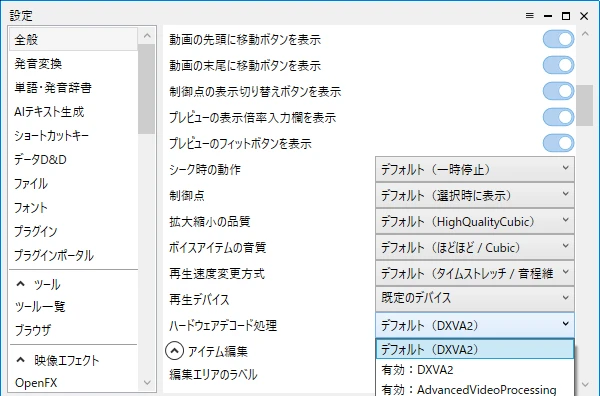
| Setting | Options | What I found |
|---|---|---|
| Hardware decoding process (ハードウェアデコード処理) | Default (DXVA2) / Enabled: DXVA2 / Enabled: Advanced video processing / Disable | Whichever I chose, neither the preview picture nor the numbers changed (H.264 and AV1 mp4 files) |
| Scaling quality (拡大縮小の品質) | Default (High quality cubic) / NearestNeighbor / Linear / Cubic / MultiSampleLinear / High quality cubic | NearestNeighbor makes scaled pictures rougher, but the smoothness did not change |
| Preview zoom (below the preview) | 50% to 800%, or fit to the window | Changes the display size. It is not for making the preview lighter |
| Preview playback speed (below the preview) | x 0.25 to x 8.0 | Same as above |
- I found no setting that lowers the preview resolution or frame rate to make it lighter (the equivalent of “preview quality” or “proxy” in other video editors)
- After changing Hardware decoding process, restart YMM4. It had no visible effect with the mp4 files on this PC, but the official FAQ lists changing or disabling this setting as a fix when the preview freezes or the picture is garbled
If the preview is still heavy or freezes
The problem did not occur on my PC this time, so from here on these are fixes I could not test myself. They are collected in the official FAQ (in Japanese).
- The preview freezes, the picture is garbled or dark, or the export does not finish: change the priority of the video loading plugins, change or disable hardware decoding, or convert H.265 video to H.264
- The integrated GPU is used instead of the graphics card: how to fix it when YMM4 runs on the integrated GPU although you have a graphics card
- What my results suggest: lowering the number, resolution, or bitrate of the videos playing at once lowers the GPU decoding load. If you put a 4K recording into a Full HD video, converting it to Full HD first is the safe choice
2021 versus now
| 2021 (v3.9.9.173 β73) | Now (v4.57.0.1) | |
|---|---|---|
| Loading pause or freeze at video items | Happened | Did not happen |
| Moving from an HDD to an SSD | No change | No difference |
| Video converted to a constant frame rate | Heavy | Same as the variable video |
| Editing VFR footage as it is | Smoother, but I worried about audio drift | Smooth, and the exported video is off by 0 frames |
| Exporting | Passed to AviUtl | YMM4 exports on its own |
Personally, I think the old problem was on YMM4’s side and was fixed over its many updates. But my PC is also different now, so I can no longer tell which of the two made the difference.
Summary
- On the current YMM4 (v4.57.0.1) and my current PC, the preview did not freeze at video items
- The smoothness of the preview did not change with the video format (H.264, H.265, AV1), constant or variable frame rate, or the drive (HDD or SSD)
- Editing and exporting VFR footage as it was gave a picture offset of 0 frames (checked on about 66 seconds)
- The preview gets heavy when the GPU’s video decoding nears its limit. On this PC that was twelve 4K videos, or about thirty Full HD videos
- There is no setting that lowers the preview resolution or quality. If it is heavy, lower the number, resolution, or bitrate of the videos playing at once
- YMM4 exports on its own, so the settings for passing a project to AviUtl are no longer needed
For what the windows, menus, and settings of YMM4 mean, and how to switch the interface to English, see How to Use YMM4 in English: Switch the Language and Find Your Way Around.
I used Claude (an AI) to help research and organize the information on this page.